

Connect Claude or ChatGPT to your own finances.
Let's Save runs an MCP server. MCP is the open standard Anthropic created for connecting AI assistants to other apps. Add it to Claude or ChatGPT and ask about your spending without exporting anything or handing over a bank login.
claude mcp add --transport http letssave https://app.letssave.app/mcp
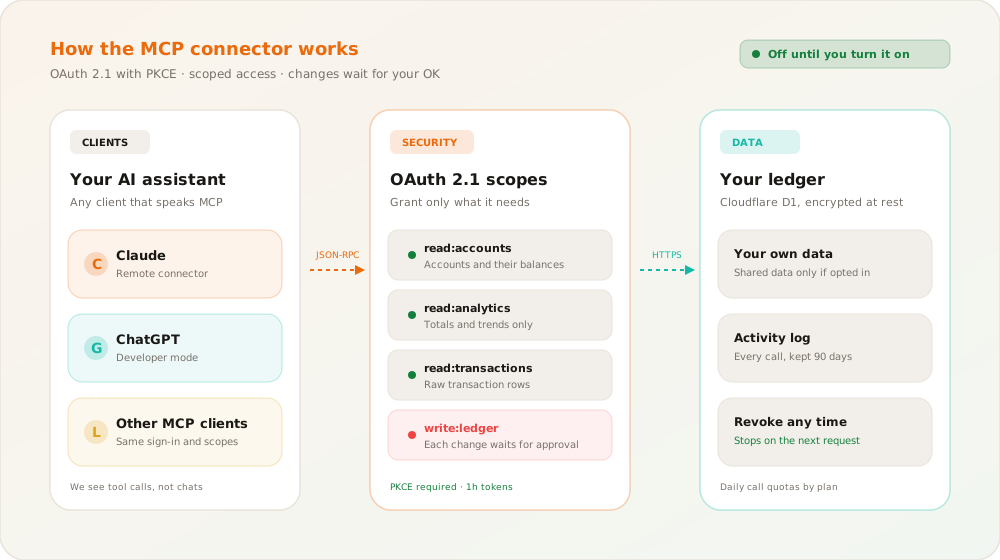
How the connection is secured
Claude, ChatGPT and other MCP clients connect over an open standard, with short-lived access tokens and an approval step for changes.
The server lives at /mcp and uses OAuth 2.1 with PKCE. Access tokens last an hour and are kept completely separate from your web session.
An assistant can ask to add transactions, categories or goal contributions. By default nothing changes until you approve it in Approvals, and an imported statement always waits for you.
Any connection can blank out transaction descriptions, and every call it makes is logged so you can check what it read.
How it works in Let's Save
An open standard, with you deciding what the assistant can see and do.
No passwords shared
You sign in on letssave.app and approve access there. The assistant never sees your password, your session or your bank login.
You approve changes
Proposed changes wait in Approvals for up to 7 days. You can let routine ones through automatically, with an amount limit if you want one.
Totals or full detail
The analytics scope gives an assistant totals and trends only. Individual transactions need a separate scope, and you can hide descriptions on any connection.
A log of every call
Settings lists each call an assistant made: when it happened, which tool it used, and how many rows came back. Logs are kept for 90 days.
Daily limits
Each plan has a daily cap on calls and changes, from 100 calls a day on Free to 2,000 on Pro. We count on our side, so an assistant stuck in a loop hits the limit and stops.
Revoke in one click
Remove a connection in Settings and it stops working on its very next request.
How to connect
Three steps, whichever assistant you use.
Turn it on and copy the address
Switch on AI connections in Settings and paste the server address into Claude or ChatGPT.
Sign in and ask
Approve access on letssave.app, then ask about spending trends, a category over the last quarter, or anything else in your data.
Approve what it suggests
If the assistant proposes new transactions or a category, review them in Approvals before anything is saved.
Importing a statement with an assistant?
Ask it to follow the Let's Save standard import format. It can hand you a file to upload, or send the rows through the connector for you to review and approve.
Ask your assistant about your money
Connect Claude or ChatGPT with the access you choose. Changes it suggests wait for you.